Screen Printing for Manufacturing & Industrial Parts Marking
For manufacturers, fabricators & production lines
Make your own marking stencils in-house, on demand. RISO digital screen makers turn a logo, part number or panel layout into a print-ready screen straight from a digital file, with no film, no emulsion and no darkroom. Print on metal, plastic, glass and more, and make a new screen whenever a part or revision changes.
Why manufacturers make their own screens
Outsourcing screens or burning them by hand slows down every new part number, revision and short run. A digital screen maker puts stencil-making next to the line.
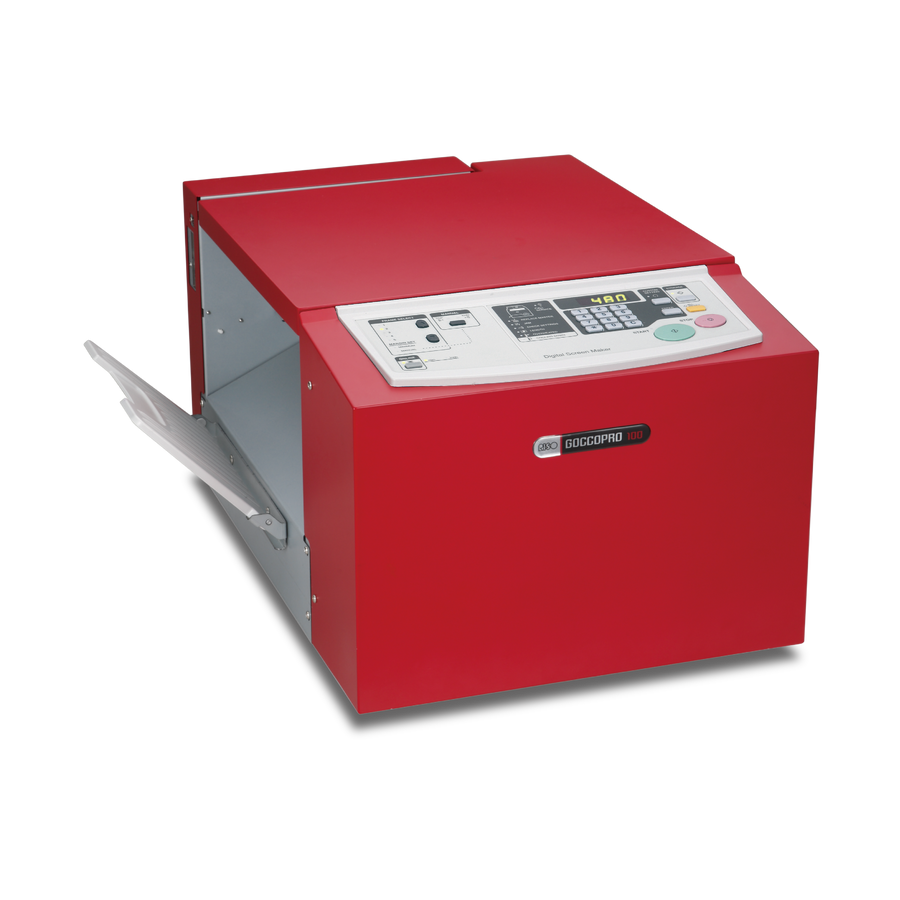
GOCCOPRO 100: stencils cut to fit your part
The GOCCOPRO 100 feeds thermal mesh continuously from a roll, so it isn't limited to one fixed frame size. It images a stencil up to 31.5" long, which you cut to size and mount on a frame or fixture that fits your part. That makes it a popular choice for marking odd-shaped or long parts, and for shops that need many different stencil sizes.
- Image areaUp to 11.69" x 31.5"
- Resolution600 x 600 dpi
- Screen making timeAbout 105 seconds
- Mesh13" x 40' rolls in 70, 120 and 200 mesh
See it in action: electrochemical marking on a metal mug
In this video, a stencil made from RISO thermal mesh is used with an electrochemical metal marking machine to mark a design onto a metal mug. The ground clip attaches to the mug, and the marker wand's electrolyte-soaked pad is pressed over the stencil. Current passes through the open areas of the mesh and permanently marks the metal underneath, with no ink.
Already own an electrochemical marking or etching machine? Make your own marking stencils from your digital files instead of ordering them pre-made.
Watch the video on Instagram
What manufacturers mark
Logos & branding
Put your brand or your customer's logo directly on parts, housings and finished products.
Metal mugs, drinkware & tools
Etch logos and text onto metal mugs, tumblers and tools with an electrochemical marking machine and a RISO mesh stencil.
Part numbers & labels
Change a part number or revision by changing the file, then make a new stencil in minutes.
Control panels & faceplates
Print legends, scales and symbols on metal and plastic panels.
Safety & warning marks
Add instructions and warnings directly to equipment instead of relying on stick-on labels.
Glass & ceramics
Mark glassware, ceramic components and other rigid materials.
Packaging & cartons
Print short runs of cardboard and packaging without ordering pre-printed stock.
How it works
-
Send your file
Export your logo, part number or layout from your design software, then print it to the screen maker.
-
Make the stencil
The machine burns your design into thermal mesh in minutes.
-
Cut & mount
Cut the stencil to size and attach it to a frame or fixture that fits your part.
-
Mark parts
Print with ink by hand or on a press, or use the stencil with an electrochemical marking machine on metal. Reuse it for the next run.
Choose your machine and mesh
| Machine | Best for | Max image area | Resolution |
|---|---|---|---|
| MiScreen A4 | Small parts, prototypes and low volume | 8.3" x 11.8" | 203 dpi |
| GOCCOPRO 100 | Long or odd-sized stencils cut to fit parts | 11.69" x 31.5" | 600 x 600 dpi |
| GOCCOPRO QS200 | Multi-color work with framed registration | 16.5" x 24.4" | 600 x 600 dpi |
| GOCCOPRO QS1836 | Fine detail on larger frames | 13.78" x 29.9" | 600 x 1200 dpi |
| GOCCOPRO QS2536 | Largest format and highest volume | 17.99" x 29.9" | 600 x 1200 dpi |
Picking a mesh: 70 mesh lays down a heavier ink deposit, 120 mesh balances fine text and solid areas, and 200 mesh is best for fine-quality printing on plastic and metal. For longer runs, premium mesh uses a thicker film for added durability, and RISO screen hardener toughens screens for extended use.
Set up your production line
Every application is different. Tell us what you're marking, the material and your volume, and we'll recommend the right machine, mesh and setup.
- Purchase orders accepted. Submit one through our purchase order page.
- Business accounts. Apply for a business account for easy reordering.
- Consumables in stock. Mesh, frames, hardener and supplies, shipped from Winston-Salem, NC.
Questions manufacturers ask
What materials can I mark?
RISO screen makers are used to print on metal, plastic, glass, cardboard, fabric and other materials. Results depend on the ink and your process, so tell us about your application and we'll help you test it.
Can I use RISO mesh as a stencil for electrochemical marking?
Yes. The video above shows a stencil made from RISO thermal mesh used with an electrochemical marking machine to mark a metal mug. Make the stencil from your file, cut it to size and use it with your marking unit.
Can I cut the stencil to fit my part?
Yes. The GOCCOPRO 100 makes stencils from a continuous mesh roll, so you can cut each one to the size and shape you need and mount it on your own frame or fixture.
How fine can the detail be?
The GOCCOPRO QS1836 and QS2536 image at 600 x 1200 dpi, and the GOCCOPRO 100 and QS200 at 600 x 600 dpi, which keeps small text and part numbers sharp.
Will screens hold up to production runs?
For longer runs, premium mesh uses a thicker film for added durability, and RISO screen hardener can toughen standard screens. Ask us which combination fits your volume.
Do the machines work with our computers?
Yes. RISO screen makers work with both Mac and Windows.
Can we buy with a purchase order?
Yes. We accept purchase orders and offer business accounts for repeat ordering.
Bring stencil-making in-house
Talk to our team in Winston-Salem, NC. Call 336-722-2500 or toll free 800-597-9530, Monday to Friday 8:30 to 5:30 ET, or email info@risosdp.com.